Struggling to translate your brand vision into compelling visual assets? Crafting a unique logo and cohesive brand identity can be a time-consuming and complex process, especially when you’re aiming for professional-quality results. If you’re looking to leverage the power of AI to accelerate this creative journey, you’ve come to the right place.
This guide dives deep into effective Midjourney prompts for logo design and brand identity. You’ll discover how to articulate your ideas clearly to the AI, explore various artistic styles and concepts, and generate a range of visual options that capture your brand’s essence. We’ll provide practical examples and actionable tips to help you refine your prompts and achieve logos that truly represent your business, making the design process more efficient and inspiring.
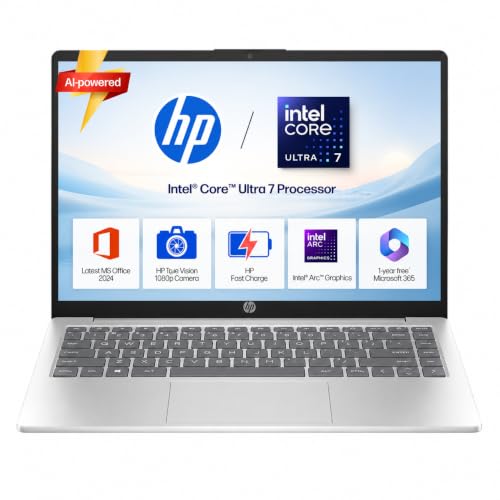
- Processor, Memory & Storage: Intel Core Ultra 7 155H (up to 4.8 GHz with Intel Turbo Boost Technology, 24 MB L3 cache, 1…
- Operating System & Preinstalled Software: Windows 11 Home | MS Office Home 2024 |1 year Microsoft 365 Basic Free|
- Display & Graphics: 35.6 cm (14″) diagonal, FHD (1920 x 1080), micro-edge, anti-glare, 250 nits, 62.5% sRGB| Graphics: I…
How to Master Midjourney v6 Prompts for Professional Logo Design
Crafting compelling logos often begins with a clear vision, and AI tools like Midjourney can be instrumental in visualizing initial concepts. For designers and entrepreneurs seeking unique brand identities, mastering Midjourney prompts for logo design is a skill that can significantly accelerate the creative process. With the advancements in Midjourney v6, achieving cleaner, more controllable outputs suitable for professional branding has become more accessible. The key lies in understanding how to steer the AI towards vector-style aesthetics, minimalist design principles, and avoiding unwanted visual noise.
Understanding Midjourney v6 syntax for vector-style graphics
To generate logo concepts that mimic the clean lines and scalable nature of vector graphics, specific keywords and structural elements are crucial in your Midjourney v6 prompts. Think about the characteristics of vector art: solid colors, defined shapes, and absence of photographic detail. Your prompts should guide Midjourney to produce images with these attributes.
Focus on terms like “vector art,” “flat design,” “line art,” “geometric,” “minimalist,” and “iconographic.” Specifying --style raw can also help reduce Midjourney’s default artistic interpretations, leading to a more straightforward, graphic output. For instance, a prompt like /imagine prompt: minimalist fox logo, geometric, line art, flat design, clean lines, white background, --v 6.0 --style raw aims for a crisp, vector-like image. While Midjourney generates raster images, these techniques help produce a strong foundation that can then be refined and truly vectorized in software like Adobe Illustrator AI. Illustrator’s Generative Shape Fill feature, for example, could then explore different design possibilities from your Midjourney concept, or Generative Expand could help resize and prepare the graphic for various applications.
Essential parameters for clean white backgrounds and flat design
Professional logos often require simplicity and versatility, which means a clean, uncluttered background and a flat design aesthetic are highly desirable. Achieving this in Midjourney v6 involves deliberate prompt construction. Incorporate phrases that explicitly request these elements.
Using white background or solid white background ensures isolation of your logo concept, making it easier to evaluate and use. For flat design, reiterate keywords like flat design, minimalist, 2D, no gradients, or solid colors. You might also specify clean, simple, or uncluttered. An effective prompt for a clean, flat logo might look like: /imagine prompt: abstract bird logo, flat design, solid colors, clean lines, minimalist, white background, --ar 1:1 --v 6.0. This helps the AI focus on the core graphic without distractions, providing a clear visual for brand identity development.
Using negative prompts to eliminate unwanted realistic shading and mockup elements
One of the most powerful tools in Midjourney for refining logo outputs is the negative prompt, denoted by --no. This parameter instructs the AI to avoid specific elements, which is invaluable when aiming for professional, unadorned logo concepts. Many default Midjourney outputs can include realistic textures, complex shading, or even mockups (like a logo on a t-shirt or business card), which are not ideal for initial logo generation.
To ensure your Midjourney prompts for logo design yield clean results, actively use --no to eliminate undesirable features. Common negative prompts for logo design include: --no shading, --no shadows, --no gradients, --no texture, --no photorealistic, --no photography, --no 3d, --no mockup, --no watermarks. This technique helps strip away extraneous details, leaving you with a more fundamental graphic representation. For example, /imagine prompt: modern tech logo, abstract, geometric, flat design, white background, --no shading, texture, 3d, mockup, photography --v 6.0 will guide Midjourney towards a pure, two-dimensional logo graphic. Remember, while Midjourney can provide excellent concepts, tools like Adobe Illustrator AI remain essential for final vectorization, precise color control, and ensuring professional-grade output, especially since Illustrator has no free version and offers a more robust suite for graphic design.
AI Brand Identity Design: Midjourney Prompts by Industry and Niche
Crafting a distinct brand identity often begins with a compelling logo. While traditional design processes are robust, AI tools like Midjourney offer a unique avenue for rapid ideation and visualization. By leveraging specific Midjourney prompts for logo design, businesses can explore a vast range of aesthetic directions tailored to their industry and niche, then refine these concepts using professional vector software.

- Graphics Processing : GeForce RTX 3060
- Core Clock : 1792 MHz (Reference Card: 1777 MHz); CUDA Cores : 3584
- Memory Clock : 15000 MHz; Memory Size : 12 GB
Minimalist tech startup and SaaS logo prompts
For tech startups and SaaS companies, logos typically lean towards minimalism, clean lines, and abstract representations that convey innovation and efficiency. The goal is often a memorable mark that works well across digital platforms, from app icons to website headers. Focusing on geometric shapes, modern typography, and subtle color gradients can yield sophisticated results.
When generating ideas, consider prompts that emphasize simplicity and a futuristic feel:
- “Minimalist abstract logo for a SaaS company, representing data flow and connectivity, clean lines, gradient blue and purple, modern, vector art, flat design, iconographic”
- “Sleek tech startup logo, geometric ‘A’ lettermark, dark mode friendly, simple, professional, sans-serif font, line art style”
- “Abstract icon for AI software, data visualization, neural network concept, line art, professional, clean, white background”
- “Modern fintech logo, overlapping geometric shapes, secure, innovative, abstract, teal and silver, digital art”
Once Midjourney generates these initial concepts, a tool like Adobe Illustrator AI becomes invaluable for professional refinement. Illustrator’s Smarter Snapping Tools, for instance, improve design precision by allowing snapping to tangents or curved shapes, ensuring perfectly aligned minimalist elements. Its Generative Shape Fill feature can also explore different design possibilities to fill shapes with AI models like GPT-4o and Gemini 2.5, helping designers iterate on abstract forms quickly. However, it’s worth noting that Illustrator is a subscription-based software, with no free version, offering a free trial instead.
Vintage and rustic coffee shop badge design prompts
Coffee shops, artisanal bakeries, and craft breweries often seek logos with a vintage, rustic, or hand-crafted aesthetic. These designs evoke a sense of tradition, warmth, and authenticity. Badge logos and emblems are particularly popular, incorporating elements like natural textures, classic typography, and illustrative details.
To guide Midjourney towards this style, include descriptors that convey age, texture, and specific imagery:
- “Rustic coffee shop logo, vintage badge emblem, hand-drawn illustration of coffee beans and steam, warm earth tones, distressed texture, traditional, vector”
- “Artisan bakery emblem, retro feel, illustration of wheat stalk and rolling pin, script font, warm brown and cream, textured, woodcut style”
- “Craft brewery label design, woodcut style, illustration of mountains and hop elements, bold typography, traditional, dark background, detailed”
- “Farm-to-table restaurant logo, circular badge, hand-drawn vegetables, organic feel, green and brown palette, antique typography”
Refining the intricate details of a vintage badge design is where professional tools shine. Adobe Illustrator AI offers an Enhanced Gradient Tool with presets for more precise color transitions, which can be essential for achieving the subtle shading often found in rustic illustrations. Its ability to work with vector graphics ensures that these detailed designs remain sharp and scalable for everything from signage to merchandise, without pixelation. Pricing for Illustrator varies, from a single app monthly subscription at $31.49 to yearly commitments that reduce the cost, or bundled Creative Cloud All Apps plans.
Luxury fashion and cosmetics monogram prompts
Luxury brands in fashion and cosmetics demand logos that exude elegance, sophistication, and exclusivity. Monograms, abstract forms, and refined typography are common choices, often incorporating metallic textures or delicate gradients. The design must convey premium quality and a timeless appeal.
For these high-end aesthetics, emphasize luxury materials, classic design principles, and refined details in your prompts:
- “Luxury fashion brand monogram, elegant intertwined ‘LV’ initial, gold foil texture, minimalist, black background, sophisticated, high resolution, vector”
- “High-end cosmetics logo, abstract floral design, soft pastel gradients, delicate lines, premium feel, modern serif font, subtle shimmer”
- “Jewelry brand emblem, Art Deco style, geometric, rose gold metallic finish, exclusive, intricate pattern, for luxury packaging”
- “Perfume brand logo, abstract, fluid lines, deep emerald green and gold, elegant, minimalist, sophisticated, vector illustration”
The precise rendering of fine details and textures is critical for luxury branding. Adobe Illustrator AI is an industry
Midjourney vs Dedicated AI Logo Generators: Which Creates Better Brand Assets?
The landscape of AI design tools offers diverse approaches to creating brand assets. On one hand, you have generative AI art tools like Midjourney, which excel at producing unique visual concepts and styles from text prompts. On the other, there are dedicated AI logo generators, often designed to streamline the logo creation process, and professional design software like Adobe Illustrator, which integrates AI features to enhance vector graphic production. The choice between these often comes down to the desired level of creative control, scalability requirements, and the final format of the brand assets.
Midjourney vs Looka: Creative control versus automated SVG generation
When considering tools like Midjourney and Looka for brand identity design, it’s important to understand their core functionalities. While specific feature details for Midjourney and Looka are not provided, we can contrast their general approaches with a professional vector design tool. For instance, Adobe Illustrator AI offers a high degree of creative control over vector graphics, which are essential for logos. Its Generative Shape Fill feature, powered by AI models like GPT-4o and Gemini 2.5, allows designers to explore various design possibilities by intelligently filling shapes. This capability provides a foundation for detailed and precise logo work.
Furthermore, Illustrator’s Generative Expand feature helps seamlessly resize graphics and add bleeds, crucial for preparing professional designs for print or digital use. Unlike more automated generators that might offer predefined templates, Illustrator provides the flexibility to craft unique, scalable vector assets from the ground up or refine AI-generated concepts into polished brand elements. This level of control is paramount for establishing a distinct brand identity.
Vector scalability limitations of AI raster images and how to vectorize them
A significant difference between general AI image generators and professional design tools lies in their output format. Tools that produce AI raster images, such as those generated by prompts in Midjourney, create pixel-based graphics. While these images can be visually stunning, they inherently face vector scalability limitations. When a raster image is enlarged, its pixels become visible, leading to a blurry or pixelated appearance—unacceptable for professional logos and brand assets that need to adapt across various sizes, from a small favicon to a large billboard.
This is where vector graphics become indispensable. Adobe Illustrator AI is an industry-standard vector graphics editor. It allows designers to create artwork using mathematical paths, points, and curves, ensuring that designs remain crisp and clear at any scale. While the provided data does not specify a direct “raster-to-vector” conversion tool within Illustrator’s AI features, its core functionality is to create and manipulate vector assets. Designers can use Illustrator to trace or recreate raster concepts into scalable vector formats, ensuring brand consistency and quality across all mediums.
Pricing breakdown and commercial usage rights for AI-generated brand identity
Understanding the financial commitment and usage rights is crucial when selecting tools for brand identity. For professional design work, Adobe Illustrator AI operates on a subscription model, offering various plans to suit different user needs. Specific pricing and commercial usage rights for other AI logo generators like Midjourney or Looka are not specified in the provided data.
Here’s a breakdown of Adobe Illustrator’s pricing:
| Plan Type | Billing Cycle | Price (USD) | Notes |
|---|
What Are the Best Midjourney Logo Prompts for Abstract Geometric Concepts?
Creating compelling abstract geometric logos with AI requires a thoughtful approach to prompting. Midjourney excels at generating visually striking concepts, but guiding it towards precise geometric forms and brand-appropriate aesthetics demands specific keywords and parameters. The goal is to move beyond generic shapes to designs that resonate with a brand’s identity, often requiring further refinement in vector software like Adobe Illustrator AI.
How to prompt for sacred geometry and line art aesthetics
For logos that evoke sacred geometry or minimalist line art, your Midjourney prompts should emphasize precision, intricate patterns, and a clean aesthetic. Think about the underlying principles: symmetry, proportion, and often a spiritual or sophisticated feel.
Effective prompts might include terms like:
sacred geometry logo, intricate, precise, golden ratio, minimalist, line art, elegant, monochromatic, white background, vector --ar 1:1 --v 6flower of life symbol, minimalist line art, clean, modern, abstract, precise, elegant, brand identity, vector style --ar 1:1 --v 6geometric pattern logo, thin lines, symmetrical, abstract, precise, corporate identity, clean design, vector --ar 16:9 --v 6
After generating initial concepts, designers often take these raster images into a vector editing program. Adobe Illustrator AI is an industry standard for this, allowing you to trace, refine, and vectorize the generated line art. Its “Smarter Snapping Tools” can be particularly useful for ensuring perfect alignment and symmetry when recreating or cleaning up geometric elements, making the final logo production-ready and scalable for any application.
Generating isometric 3D app icons and modern gradients
Isometric 3D app icons and logos with modern gradients are popular for tech companies and digital products. Midjourney can produce impressive initial renders, focusing on depth, smooth transitions, and a contemporary feel. The key is to specify the perspective and gradient characteristics clearly.
Consider these prompt structures:
isometric 3D app icon, abstract geometric shape, modern, sleek, vibrant gradient colors, soft shadows, clean lines, white background, vector style --ar 1:1 --v 6minimalist 3D logo, isometric cube, smooth gradient, blue to purple, clean, modern tech brand, app icon design, vector --ar 1:1 --v 6abstract geometric logo, glassmorphism style, isometric, translucent, modern gradient, soft lighting, UI design, vector --ar 1:1 --v 6
Once Midjourney provides a visual direction, Adobe Illustrator AI becomes essential for translating these concepts into scalable vector graphics. Illustrator’s “Enhanced Gradient Tool” allows for precise control over color transitions, ensuring the gradients are smooth and professional. Additionally, the “Generative Shape Fill” feature could be explored to quickly experiment with different color fills and patterns within the isometric shapes, speeding up the design iteration process for app icons.
Creating symmetrical emblems and crests with specific aspect ratios
Symmetrical emblems and crests convey tradition, quality, and authority, often used by luxury brands, educational institutions, or corporate entities. Achieving perfect symmetry and the desired aspect ratio in Midjourney requires careful prompting, followed by detailed vector work.
Here are some effective Midjourney prompts for this style:
symmetrical emblem logo, abstract geometric, intricate details, minimalist, elegant, gold and black, corporate identity, vector --ar 1:1 --v 6modern crest logo, symmetrical, abstract lines, clean, sophisticated, brand badge, white background, vector --ar 3:2 --v 6heraldic shield logo, abstract geometric pattern, symmetrical, strong lines, luxurious, detailed, brand mark, vector --ar 4:3 --v 6
For these types of logos, maintaining absolute symmetry and precision is paramount. While Midjourney can generate excellent starting points, Adobe Illustrator AI offers the tools needed for final production. Features like “Smarter Snapping Tools” are invaluable for ensuring every element aligns perfectly, and the ability to work with vector paths means the emblem will be infinitely scalable without losing quality. If a design needs to be adapted for various print or digital sizes, Illustrator’s “Generative Expand” can help seamlessly resize graphics and add bleeds, making it ready for any application. It’s worth noting that Adobe Illustrator AI is a subscription-based software, offering various plans from monthly to yearly commitments, including options for businesses and students. There isn’t a free version, only a trial.
Step-by-Step Workflow: From Midjourney Prompt to Scalable Vector Logo
Transforming a conceptual image from an AI generator into a polished, scalable vector logo requires a structured approach. While tools like Midjourney excel at creating stunning visual concepts, the output is typically a raster image, which isn’t suitable for professional branding that demands infinite scalability. This workflow outlines how to bridge that gap, moving from an initial Midjourney prompt for logo design to a refined vector graphic.
Step 1: Generating High-Resolution Concept Variations in Discord
The journey begins in Midjourney, where your carefully crafted prompts guide the AI to generate a range of logo concepts. Focus on describing the brand’s essence, desired style, colors, and any specific elements. Experiment with different prompt structures and parameters to produce diverse variations. Aim for high-resolution outputs using Midjourney’s upscaling options, as this provides a better foundation for the subsequent steps. Generating multiple variations allows you to select the most promising candidates that align with your brand identity vision.
Step 2: Upscaling and Removing Backgrounds Using Auxiliary Tools
Once you have a selection of Midjourney-generated logo concepts, the next step often involves further refinement of the raster image. This typically includes upscaling the image to an even higher resolution, if necessary, to capture finer details before vectorization. Additionally, removing the background from your chosen logo concept is crucial. This isolates the core design, making it easier to work with in vector editing software. While Midjourney offers some background control, dedicated auxiliary tools (not specified in provided data) often provide more precise and cleaner background removal, preparing the image for the vectorization stage.
Step 3: Vectorizing Raster Graphics in Adobe Illustrator or Vectorizer.ai
The final, critical step in creating a scalable logo is vectorization. Since Midjourney outputs raster images (pixel-based), they lose quality when scaled up. A vector graphics editor is essential here. Adobe Illustrator AI stands as an industry standard for this task, allowing designers to convert raster images into vector formats that can be resized without any loss of fidelity.
While Illustrator’s core strength lies in vector creation, you can use your Midjourney output as a template. Designers typically trace over the raster image manually or use Illustrator’s tools to recreate the logo elements as clean, scalable vector paths. This process ensures crisp lines and sharp edges, vital for a professional logo.
Adobe Illustrator AI integrates several AI-powered features that can assist during the design refinement phase. For instance, Generative Shape Fill can explore different design possibilities by filling shapes with AI-generated content, potentially offering new textures or patterns for elements within your vectorized logo. Generative Expand helps seamlessly resize graphics and add bleeds, enhancing productivity as you finalize the logo for various applications. The Enhanced Gradient Tool provides smoother color transitions, crucial for complex brand identities, while Smarter Snapping Tools improve precision by allowing snapping to tangents or curved shapes.
Keep in mind that Adobe Illustrator AI operates on a subscription model, offering various plans including a monthly or yearly commitment. There isn’t a free version, though a free trial is available for those looking to test its capabilities. For full access to generative AI credits across Adobe’s suite, a Creative Cloud Pro plan might be necessary, as some AI features can be limited in individual app plans. Illustrator integrates well with other Adobe Creative Cloud applications and utilizes Adobe Firefly for AI content creation, making it a powerful hub for comprehensive brand identity design.
Frequently Asked Questions About AI Logo Design Prompts
Can Midjourney generate logos with exact readable typography?
While Midjourney excels at generating stunning visuals and intricate designs, its current capabilities (even in v6) generally struggle with producing exact, consistently readable typography within an image. When you use Midjourney prompts for logo design, especially those requiring specific brand names or taglines, the text often appears distorted, jumbled, or in a stylized, unreadable font.
For precise typography, it’s usually best to use Midjourney for the visual elements and then integrate text using dedicated graphic design software. Tools like Adobe Illustrator AI are specifically built for vector graphics and offer robust text tools. You can bring your AI-generated visual concept into Illustrator and add your brand name with perfect clarity and control over fonts, kerning, and styling. Illustrator’s Generative Shape Fill and Generative Expand features can even help refine the overall design once your core elements are in place.
How do I copyright an AI-generated brand identity?
Copyrighting an AI-generated brand identity is a complex area, as intellectual property offices generally require human authorship for copyright protection. If a logo or brand identity is purely generated by an AI tool like Midjourney without significant human creative input, it may not be eligible for copyright.
The key often lies in the human element. If you use Midjourney to generate initial concepts or elements, but then substantially modify, arrange, or combine these elements with your own creative decisions in a tool like Adobe Illustrator AI, the resulting work may be copyrightable. The human designer’s choices in composition, color, typography, and refinement are what establish authorship. For instance, using Illustrator’s enhanced gradient tool or smarter snapping tools to perfect an AI-generated shape would demonstrate creative human input. Always consult with an intellectual property lawyer for specific advice regarding your unique situation.
What are the best parameter settings for graphic design in Midjourney v6?
When crafting Midjourney prompts for logo design and graphic elements in v6, several parameters can significantly influence the output. While there isn’t a single “best” setting, adjusting these can help achieve a more refined, design-oriented result:
--ar(Aspect Ratio): For logos,--ar 1:1(square) is a common starting point, but consider--ar 4:3or--ar 16:9for more horizontal or vertical brand marks.--style raw: This parameter can help reduce Midjourney’s default aesthetic bias, leading to cleaner, less “artistic” results that are more suitable for graphic design.--v 6.0(Version): Ensure you’re using the latest version for improved image coherence and prompt understanding.--s(Stylize): A lower stylize value (e.g.,--s 100or--s 250) can yield simpler, more graphic designs. Higher values tend to add more detail and artistic flair, which might be less ideal for minimalist logos.--c(Chaos): Lower chaos values (e.g.,--c 0to--c 20) will produce more consistent results across variations, which is beneficial when trying to refine a specific logo concept.
Experimenting with these parameters in conjunction with detailed Midjourney branding prompts is crucial for guiding the AI towards a usable graphic design output. Remember, iteration is key to refining your AI-generated logo concepts.